Yearly Archives: 2013

Locking in Microsoft SQL Server (Part 17) – Implementing Critical Section / Mutexes in T-SQL

Today I’d like us to discuss how we can implement analog of Critical Section (or Mutex) in T-SQL. One of the tasks when it could be beneficial is when we need to prevent the multiple sessions from reading the data simultaneously. As the example let’s think about the system which collects some data and does some kind of post processing after data is inserted.

One of the typical implementation in such architecture would be having the farm of the application servers that do the post processing. We usually need to have more than one server in such scenario for scalability and redundancy reasons. The key problem here is how to prevent the different servers from reading and processing the same data simultaneously. There are a few ways how we can do it. One approach would be using central management server that loads and distributes the data across processing servers. While it could help with the scalability we will need to do something to make that server redundant. Alternatively we can use some sort of distributed cache solution. We could load the data there and every server grabs and processes the data from the cache. That approach could be scalable and work great although distributed cache is not the easy thing to implement. There are the few (expensive) solutions on the market though if you don’t mind to spend money.

There are of course, other possibilities but perhaps the easiest approach from the coding standpoint would be implementing application servers in the stateless manner and do the serialization while reading the data in T-SQL.

Let’s create the table we can use in our exercises and populate it with some data.

A couple things here. First of all, we need to handle the situations when application server crashes and make sure that data would be loaded again after some time by another app server. This is a reason why we are using ReadForProcessing datetime column rather than the simple Boolean flag.

I’d also assume that system wants to read data in FIFO (first in, first out) order as much as possible and after processing is done the data would be moved into another table and deleted from the original RawData table. This is the reason why there is no indexes but clustered primary key. If we need to keep the data in the same table we can do it with additional Boolean flag, for example Processed bit column, although we will need to have another index. Perhaps:

create nonclustered index IDX_RawData_ReadForProcessing
on dbo.RawData(ReadForProcessing)
include(Processed)
where Processed = 0

In addition to the index we also need to assign default value to ReadForProcessing column to avoid ISNULL predicate in the where clause to make it SARGable. We can use some value from the past. 2001-01-01 would work just fine.

In either case, after we read the data for the processing we need to update ReadyForProcessing column with the current (UTC) time. The code itself could look like that:
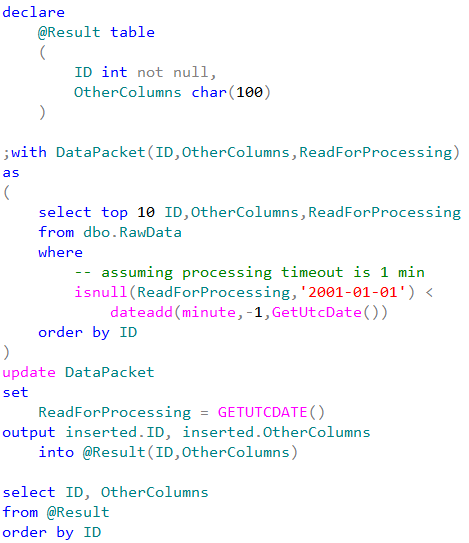
DataPacket CTE is using ordered clustered index scan. It would stop scanning immediately after read 10 rows (TOP condition). Again, we are assuming that data is moved to another table after the processing so it would be efficient. We are updating the timestamp same time when we read it and saving the package for the client in the temporary table @Result using output clause

The problem here is the race condition when two or more sessions are starting to read and update the data simultaneously. Our update statement would obtain shared (S) locks during select in CTE and after that use update (U) and exclusive (X) locks on the data to be updated.

Obviously different sessions would not be able to update the same rows simultaneously – one session will hold exclusive (X) lock on the row while other sessions would be blocked waiting for shared (S) or update (U) lock. In the first case (shared (S) lock), it’s not a problem – the blocked session will read new (updated) value of ReadForProcessing column as soon as the first session releases the exclusive (X) lock. But in the second case the second session will update (and read) the row the second time. Simplified version of the process is shown below.
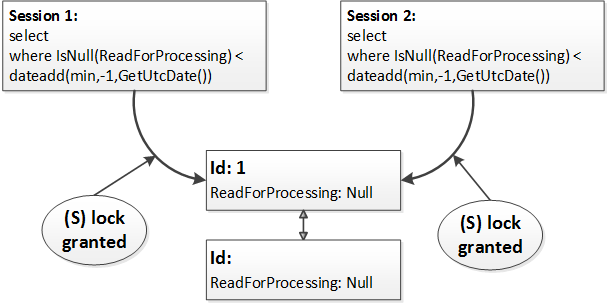
At the first step both sessions read the row acquiring and releasing shared (S) locks. Both sessions evaluate the predicate (isnull(ReadForProcessing,’2001-01-01′) < dateadd(minute,-1,GetUtcDate())) and decided to update the row. At this point one of the sessions acquires update(U) and then exclusive (X) lock while other session is blocked.
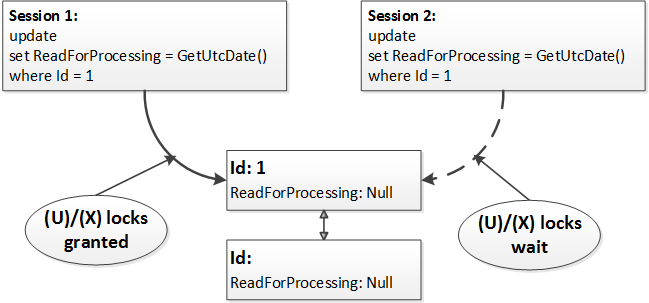
After the first session releases the exclusive (X) lock, the second session updates the same row.

How can we avoid that? We can create another resource and acquire exclusive lock on that resource before update statement from within the transaction. As we remember, exclusive (X) locks held till the end of transaction, so we will use it as the serialization point. Let’s take a look how it works by creating another table as the lock resource. Now, if we start transaction, we can obtain exclusive table lock. Again, exclusive (X) locks held till the end of transaction, so other sessions would be blocked trying to acquire the lock on the table. As result, execution of our update statement would be serialized.
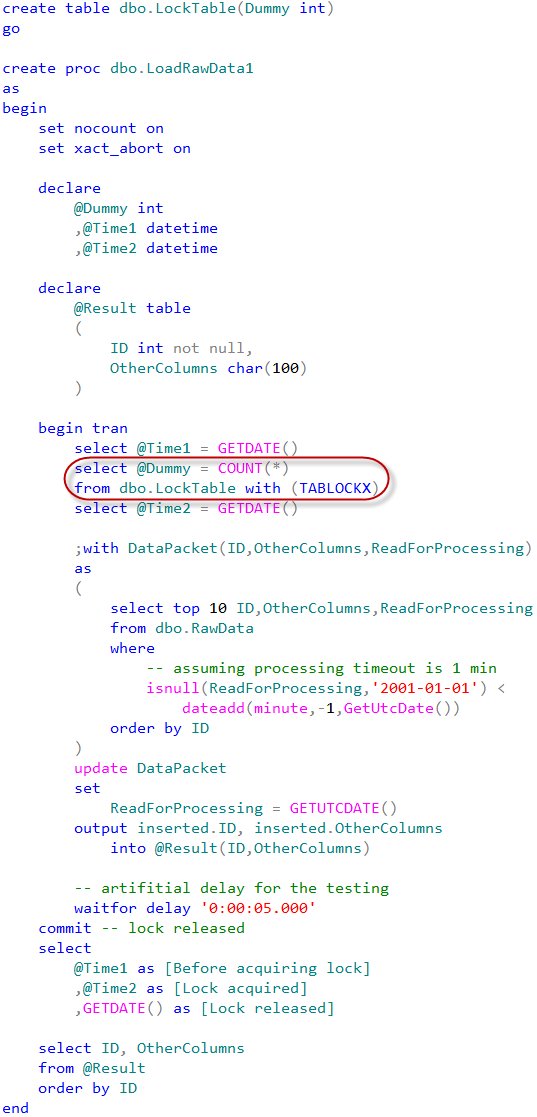
We can test that approach by running this SP from the multiple sessions simultaneously. There is the artificial delay which we are using during the testing just to make sure that we have enough time to run SP in the different session.
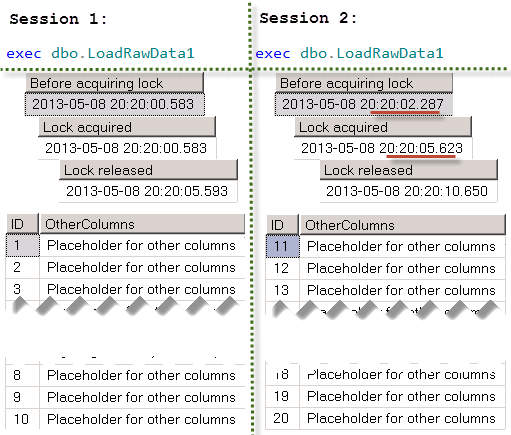
While that approach works, there is another, better way to accomplish the same task. We can use application locks. Basically, application locks are just the “named” locks we can issue. We can use them instead of locking table.
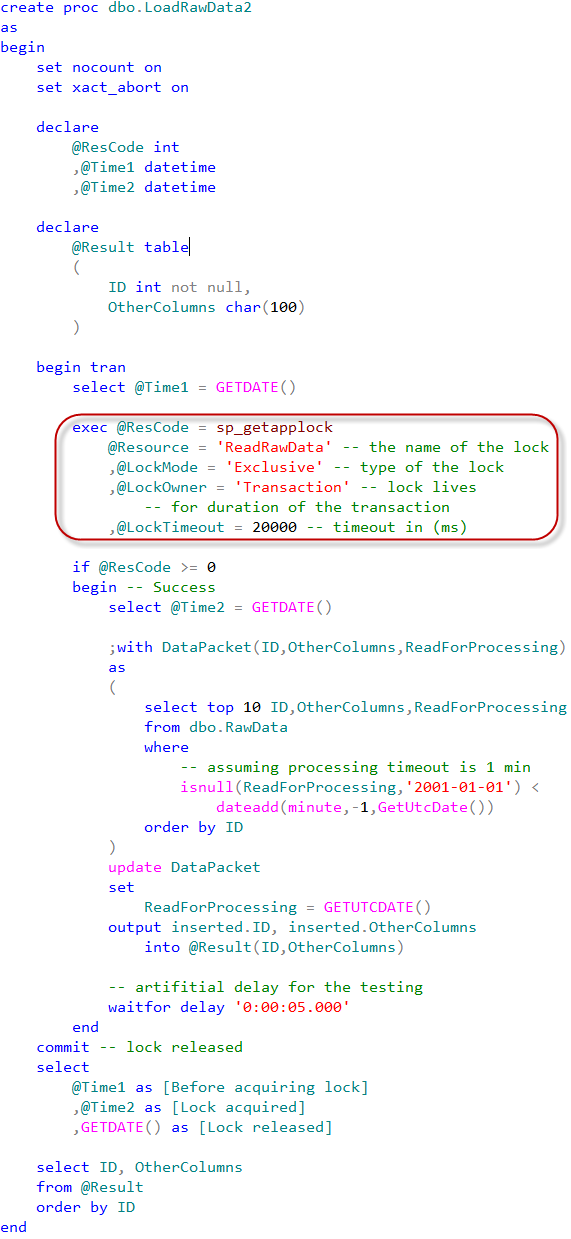
That would lead to the same results.

Application locks are also very useful when we need to implement some code that alters the database schema (for example alter partition function) in the systems that are running under load all the time (24×7). Our DDL statements can issue shared application locks while DDL statements acquire exclusive application locks. This would help to avoid deadlocks related to the lock partitioning. You can see the post about lock partitioning with more details about the problem and implementation.

Although, if we talk about specific task of serialization of the reading process, we don’t need critical section at all. We can use the locking hints instead.
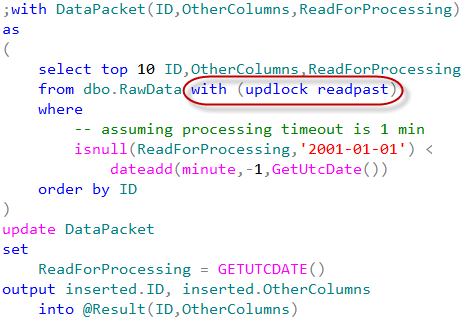
As you can see, there are two locking hints in the select statement. UPDLOCK hint forces SQL Server using update (U) locks rather than shared (S) ones. Update locks are incompatible with each other so multiple sessions would not be able to read the same row. Another hint – READPAST – tells SQL Server to skip the locked rows rather than being blocked. Let’s modify our stored procedure to use that approach.

I’m adding some code to the procedure to emulate race condition. In one session we will run the stored procedure with @UseDelay = 1. In another with @UseDelay = 0. Both of those sessions will start to execute the main update statement roughly at the same time.
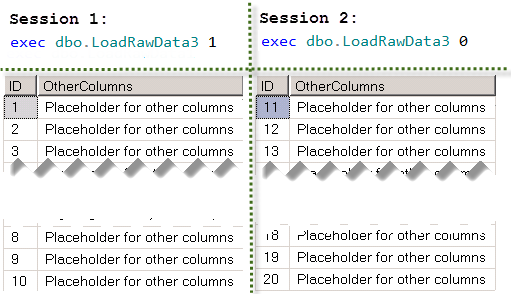
This method works even more efficiently than the “critical section” approach. Multiple sessions can read the data in parallel.

Well, I hope that we achieved two goals today. First – we learned how to implement critical section and/or mutexes in T-SQL. But, more importantly, I hope that it taught us that in some cases, the “classic” approach is not the best and we need to think out of the box. Even when this thinking involved the standard functional available in SQL Server.

Source code is available for download
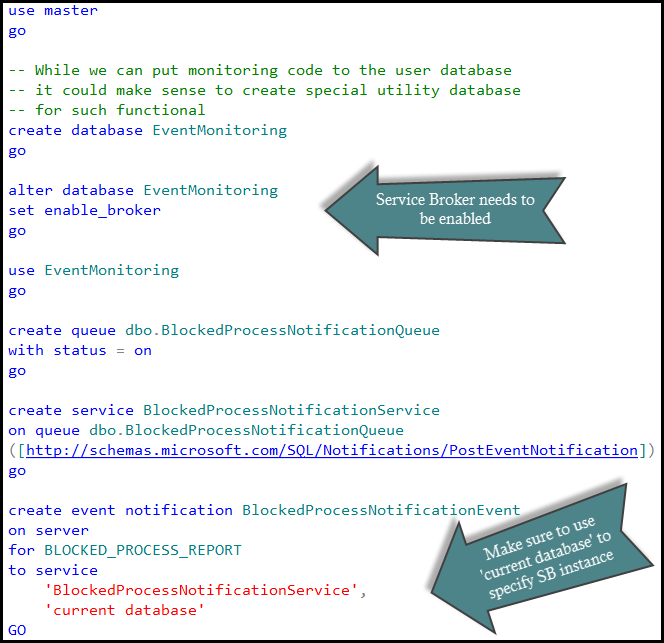
Table of content

Next: Key lookup deadlock


SQL Saturday #201

South California is great! I’ve never seen seven-stuck-lanes-in-each-direction highways 🙂 And thanks to the crew! They did the wonderful job!

Slide decks are available for download. Also, if you are interested in the locking and blocking, check the following page. It has a lot of additional information.

Again, thank you for attending! It was the great event!

Locking in Microsoft SQL Server (Part 16) – Monitoring Blocked Processes Report with Event Notifications

UPDATE 2018-08-01: New and redesigned version of the code is available here

As we already know it’s very easy to capture blocked process report by using SQL Traces. That method though has a few limitations. First of all, it means we need to have SQL Trace up and running all the time. And SQL Trace, especially the client one, introduces the overhead on SQL Server. Another big problem is that we need to monitor traces on the regular basis. And in case if we had the blocking from within the stored procedures (e.g. session input buffer contains SP reference only), we would need to use sql handles and get the estimate execution plan from the plan cache. Nothing guarantees that plan would be there by the time when we start troubleshooting the blocking problem. Of course, we can set up an alert with SQL Agent and get the notification when blocking
occurs although it would still mean that we have to do our job manually.

As another option we can use Event Notification for BLOCKED_PROCESS_REPORT event. This approach would utilize Service Broker so we would be able to create activation stored procedure and parse blocking report there. Let’s take a look at that.

First of all, we need to decide where to store the data. While we can put the table to the user database, I’d prefer to use separate utility database for the data collection. Let’s do that:

At that point we would have blocked process report events going to dbo.BlockedProcessNotificationQueue service broker queue. Assuming, of course, that we have blocked process threshold option set.

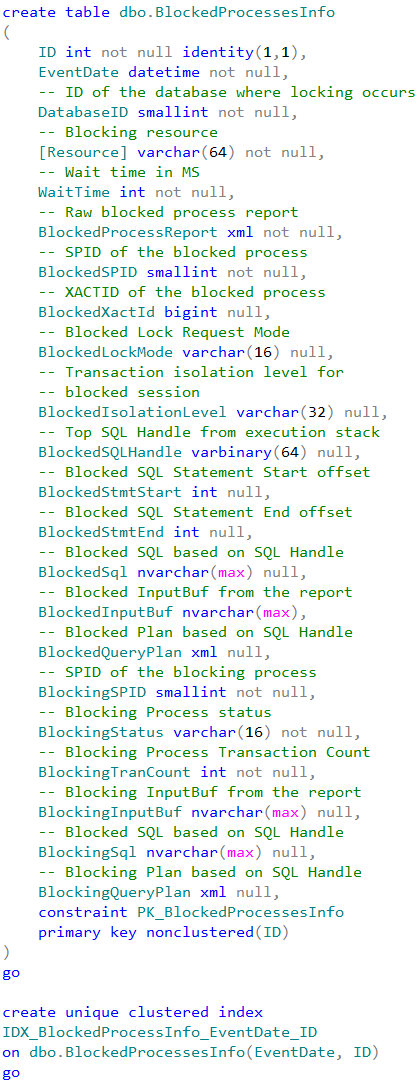
Obviously we do not want to have those messages sitting in the queue – it’s kind of defeating the purpose of having the process automated. What I would like to do at this point is shredding event data and putting it to the table for analysis. Another important factor is that blocked process monitor would generate separate events for the same blocking condition every time it wakes up. For example, if we have blocking process threshold set to 5 seconds, we can get five events until our query times out after 30 seconds. Ideally I’d like to combine those events into the single one to have analysis simplified. So let’s create the table to store the data.

This table stores the information about both – blocked and blocking processes. Although blocking information can be misleading in case if blocking session currently executes the different batch or even waiting for the next batch to be executed – table would store the current state rather than info at the time when blocking occurs. In any cases, from the blocking process standpoint the most interesting attributes are:

  1. Process Status – is it running, sleeping or suspended? If it’s sleeping, it could be the sign that client does not work with transations correctly – either did not commit one of the nested transactions or, perhaps, mixed them with UI activity. Suspended status could be the sign of the blocking chain which is another story
  2. TranCount – if it’s more than one, it would tell us that we have nested transactions and again, perhaps, client does not handle them correctly.

In any case, we will have full report stored and can access it if needed. And of course, we can modify the table and add extra attributes if we want to.

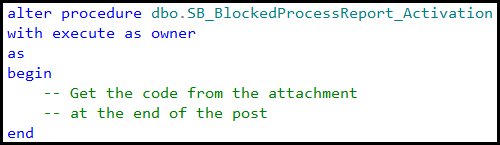
Now it’s the time to put the activation procedure in place. I’m going to cheat a little bit here – click at the link to the source code at the end of the post to see it.

There are two things I’d like to mention though. First one is how we get the query plans.  For the blocked process we are trying to get it from sys.dm_exec_requests first. This is the only bullet-proof way to get the real plan but it would work only if the statement is still blocked when activation SP executes. If this is not the case we are using sys.dm_exec_query_stats DMV. There are a couple challenges though. First, there is the chance that plan would not be there – for example in case of the memory pressure. Alternatively we have the situation when there are multiple plans due recompilation. We are trying to guess the right one by filtering based on the blocking time but that method is not always working. So no guarantees. For the blocking process we are always using sys.dm_exec_query_stats picking up the top (random) plan.

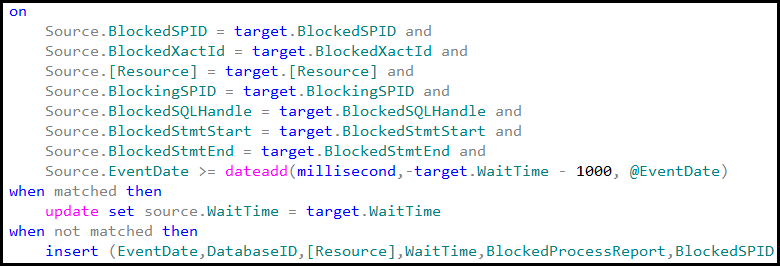
Another thing is how we are looking up if there are other events for the same blocking. Basically stored procedure is trying to match various columns in the merge statement – perhaps even more than needed – but in either case I’d rather have duplicate records than incorrect information.

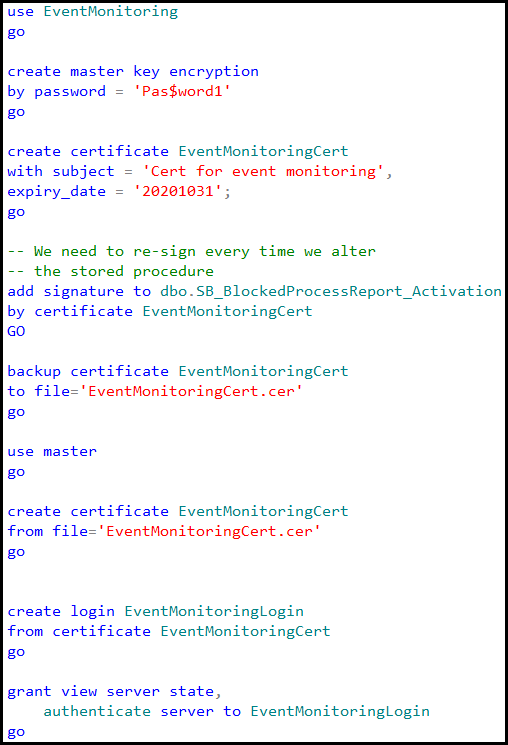
Last step we need to do is setting up the security. That step is kind of optional in case if we are storing the data in the user database but in our case, when we create the blank database and set up everything under “dbo” user it’s required. When Service Broker activates the stored procedure under that security context (EXECUTE AS OWNER), dbo has enough rights to deal with the database object. But that user also needs to have the rights to query system DMV. As result, we need to create the certificate in the both, EventMonitoring and master databases, create the login from the certificate, grant this login “view server state” and “authenticate server” rights and finally sign the stored procedure with the certificate. Or, perhaps, mark the database as Trustworthy 🙂

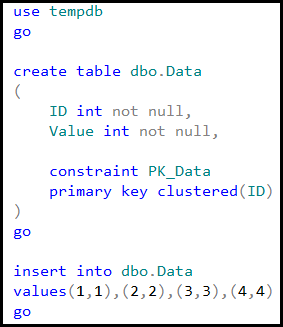
And now it’s time for the testing. Let’s create the small table and populate it with a few records.

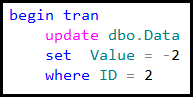
Next, let’s place exclusive (X) lock on one of the rows in the first session.

In another session let’s introduce the table scan in read committed isolation level.

If we query the service broker queue we would see that there are a few events there. Our queue does not have automatic activation yet.

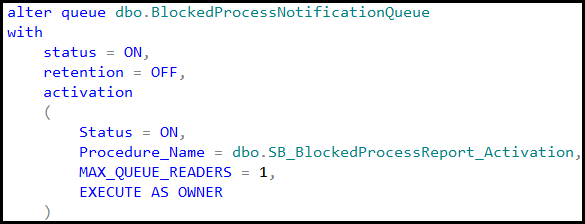
And finally let’s alter the queue to enable the activation.

Next, let’s query the table.

As we can see, there is the single record in the table now – exactly what we need. This approach is, of course, customizable. You can collect other statistics by changing the implementation. Hope, that script would be the great starting point

Next: Implementing Critical Sections / Mutexes in T-SQL

Table of content


Upcoming Presentations and Events

I’m doing a few presentations in the next a few weeks.

February 16th, 2013: I’ll speak at IT Pro Camp in Sarasota, FL. I will present two sessions – “SQL Server – Practical Troubleshooting” and slightly refreshed version of “Between Ground and Clouds”.

February 28th, 2013: I’ll do online presentation for Moscow SQL Server User Group. I’ll talk about practical troubleshooting of SQL Server with wait statistics, DMV and Performance Counters.Will be presented in Russian – let me know if you want to attend.

March 1st, 2013: I’ll host SQL Saturday #192 one day pre-con – “SQL Server Internals from the Practical Angle”. I’m going to talk how SQL Server works under-the-hood in the way that helps you to apply the knowledge to day-to-day tasks.

March 2nd, 2013: I’ll present at SQL Saturday #192. Will have either one or two sessions about locking and blocking. We will use bag of candies as the replacement of Power Point

Finally, on March 21st, 2013 I’ll present at 24 Hours of PASS Russia. I’m going to talk about Data Partitioning. This is the different session that I did at TechEd, or, better say, a lot of content would be different – I’m not going to talk about scaling-out and Azure and focus on the regular installation of SQL Server. I’ll show a couple of deep-dive demos focusing on how to move data between different disk arrays keeping the system online. Even with the Standard edition of SQL Server.

Hope to see you there.

Data Partitioning – Scaling-Out (Part 3: Factors to consider)

Of course, there are plenty other ways to scale-out the system in addition to horizontal partitioning and data sharding. Although in every case we have the same set of factors we need to consider before making the final decision of separating the data between the physical servers. Let’s talk about them today.

Development cost:
Scaling-out would increase development cost. The system becomes more complicated. Often there are additional tiers (application server, data warehouse, etc.) that need to be developed, tested and supported. You also need to have different kind of people in the team – while you can possibly save something by having good rather than exceptional DBA, you’d need to have very good architects and backend developers there. With the current trends when hardware prices are decreasing and development cost is rising, you’d need to consider that aspect very carefully from the beginning.

And of course, there is the question about legacy software. Neither of us want to touch old, often obsolete, code. In some cases we could be lucky and keep everything as is (again, legacy is accessing only operational data and/or we have multiple desktop shortcuts). In other cases we could face very painful and expensive process of refactoring.

Support and maintenance cost:
Well, you’ll have more servers to maintain. And everything depends on how much manual work you are doing. There is not much difference between supporting ten or one hundred servers when everything is automated but it would be completely different story when manual work is involved. PowerShell, policy-based management, data collectors and other tools and technologies – learn them – they are your friends.

Hardware and software cost:
At bare minimum you’ll need to buy OS and SQL Server licenses for each server. A lot of things depend on SQL Server Edition – in some cases scaling out would allow you to use Standard editions on the smaller servers rather than stuck with the Enterprise when you don’t scale out. You can be forced to use Enterprise edition even if you don’t need edition features simply because of 64GB RAM limitation Standard edition has. In some cases you can live with lower end storage too. So you need to carefully plan everything.

And there are the Clouds especially when we talk about SQL Server within VM (Infrastructure As A Service approach). With Clouds the picture changes dramatically. We are paying by the hour – for what we are using. There is no (or minimal) upfront cost for hardware and software. And there are physical limitations in VM configuration (RAM, # of Cores, etc.) as well as slow IO performance. Those limitations could force us to scale out regardless of the cost.

High Availability:
This one is interesting. On the one hand, with multiple servers we have to implement HA strategy multiple times (think about automation again). It introduces additional work but on the other hand gives us better (or, perhaps, different) type of protection. When we use horizontal partitioning, we obviously need to keep our main (operational period) server online if we want the system to be operational. But if the server with historical data is down, it would not affect operational activity. Same with data sharding. If we have one out of ten servers down, only ten percent of the customers would be affected. It still bad but trust me, ten percent of complaining customers are better than one hundred percent.

Of course, everything is in “It depends” category. There is no such thing as strict set of rules when scaling out is appropriate. We need to look at the systems on case by case basis and do our homework all the time.

Data Partitioning – Scaling-Out (Part 2: Data Sharding)

Last time we discussed how to scale-out our system with horizontal partitioning. Another approach that can be helpful is data sharding. With such approach we are creating multiple databases of the same (or very similar) structure and distribute (“shard”) our data between them. The typical use-case for this situation would be the system that collects data from the multiple customers where every customer works with his/her own subset of the data.

When customer logs in to the system, we redirect him/her to specific database. After that customer works within that database only. One of the key differences with horizontal partitioning is that customer-facing UI does not necessarily need to have application server. We still need to implement some sort of “redirector” – the part that knows where customer’s data is located and redirects the application to the right shard database. Although, technically speaking, as soon as it’s done, even regular 2-tier client/server system could work just fine. Don’t take me wrong – I’m not trying to suggest not implementing application server but in some cases legacy systems can work just fine with the minimum modifications.

What are the challenges there? From the customer-facing functional the biggest one is how to deal with the shared data. One of the examples is shared Article list in the point-of-sale system. We need to either replicate the data across all databases or create separate database to store that list. Obviously there are plenty of ways to replicate the data. Perhaps the simplest one would be to use snapshot replication (assuming we can have centralized publisher and articles are generally small). Although it still requires additional efforts to support it. Approach with the separate database introduces its own set of issues. It becomes single point of failure – when this database is down – all shards are down. And of course, there is the question how to access this database from the separate shards. Again, most likely linked servers will be in the game. While it’s not necessarily the big issue performance wise – those shared entities are usually small – it still introduces some overhead from development and
management standpoints.

Second interesting question is the legacy software. Well, again, it’s not necessarily a problem. The database schema remains the same across all shards so legacy software technically can work “As Is”. Assuming, of course, it can connect to and work within the single shard and we don’t mind to have large number of shortcuts on desktop.

Cross-shard database access is challenging. Similarly to horizontal partitioning, we need to design the application server that works across multiple shards. With all development challenges this architecture can be beneficial from performance standpoint – we can query shards in parallel. On the other hand cross-shard access is not always needed. Some of the use-cases (for example, CRM) could be done within the single shard. Others, such as analysis, reporting and accounting, could be implemented in the separate Data Warehouse type database with ETL processes that get the data from the shards. And we rarely need raw transaction data in the data warehouse so size should not be an issue.

One very important question is how to shard the data. In some cases we can have natural criteria – like geographic regions in the picture above. Although we need to be careful when criteria is artificial. Ideally we are looking for uniform data distribution though it could be complicated in some cases. It’s not the good idea to distribute customers data based on ID ranges when, for example, first shard stores IDs between 1 and 1,000; second one – between 1,001 and 2,000 and so on. Old customers (lowest IDs) tend to leave and we will end up with set of underutilized shards. In those cases it’s better to use modulus division: Shard_ID = ID mod Total_Number_Of_Shards.

Another thing to keep in mind is uneven amount of data across for different customers. Let’s think about GPS Tracking as the example when customers are tracking their assets. One customer can have just a few assets, another one hundreds or even thousands of them. Obviously amount of data for those customers would vary greatly. In case, if we have shard servers powerful enough and store large set of the customers per shard, we would be fine. At least should be from statistics standpoint. But it still makes sense to implement some sort of the monitoring solutions to avoid extreme situations.

Next: Scaling-out – Factors to consider